

Top AI Features in the Latest Samsung, iPhone, and Google Devices 2026: Which Platform Wins
Apple, Google, and Samsung each take a different approach to phone AI. What each platform does well, and which one fits how you use your phone.
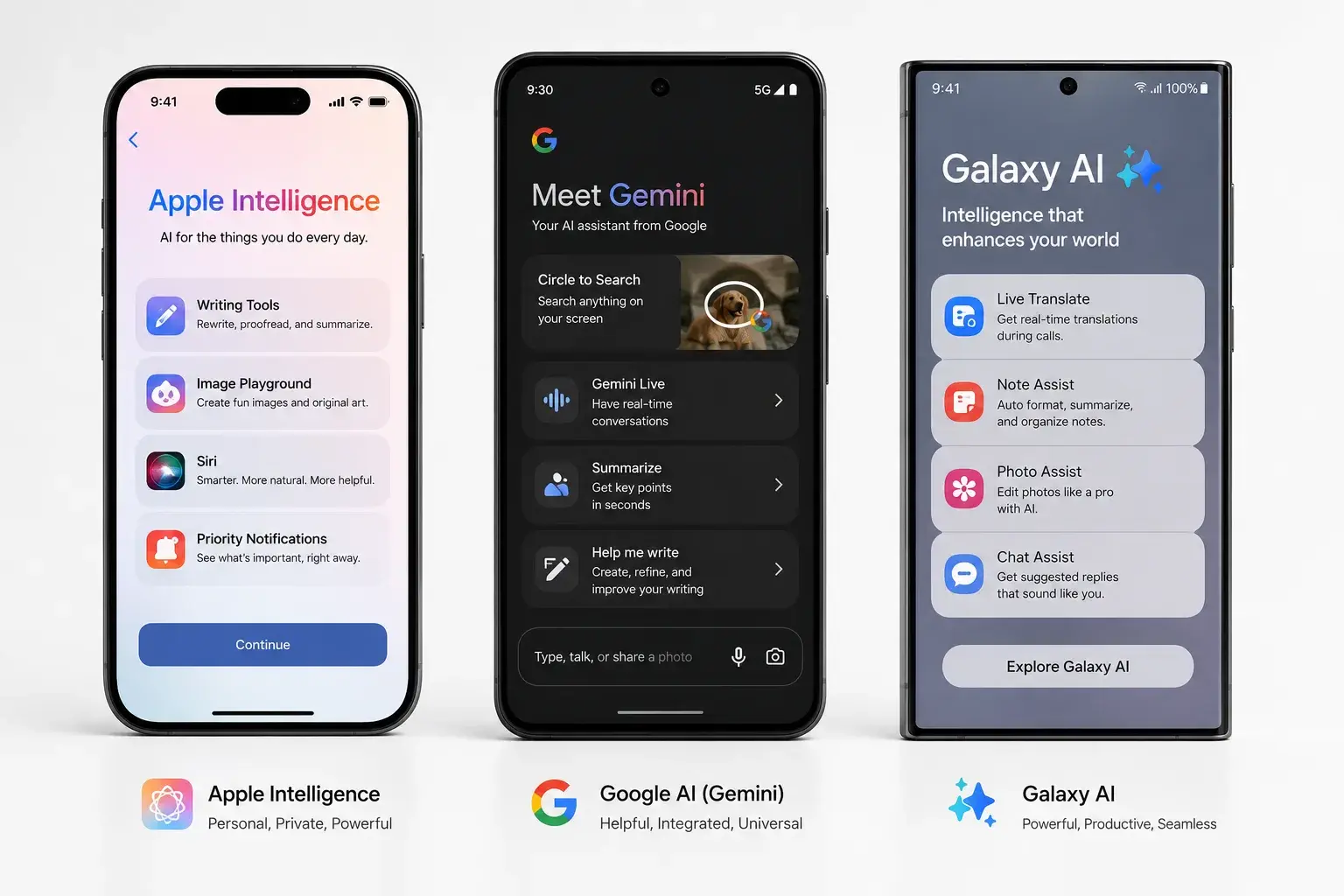
Artificial intelligence is now the main difference between smartphone platforms.
A year ago, AI on phones was marketing hype. Today it's practical. You can ask your phone questions, edit photos with AI, get writing help, and translate calls in real time.
Samsung, Apple, and Google each approach AI differently. This guide breaks down what each platform offers and which philosophy fits your needs.
The Three AI Philosophies
Apple Intelligence (privacy-first): Apple runs most AI tasks on your phone. Bigger requests go to Apple's Private Cloud Compute servers, which Apple says don't keep your data. Apple pitches this as privacy-focused.
Google Gemini (cloud + on-device hybrid): Google uses cloud processing for complex tasks, device processing for simple ones. It's faster for heavy computing but needs an internet connection for many features.
Samsung Galaxy AI (on-device + cloud integration): Samsung uses on-device AI with cloud features on top, and a setting to keep processing on the phone only. It's a middle ground.
Each approach trades speed, privacy, and capability differently.
Apple Intelligence: Privacy First
Apple Intelligence works on iPhone 15 Pro, iPhone 16, and newer, plus iPads and Macs with M-series chips. Learn more on Apple's Apple Intelligence page.
Key features:
Writing Tools. Rewrite, proofread, and summarize text anywhere on your device. Change tone (formal, friendly, concise). Generate email responses. Works in Notes, Mail, Messages, and third-party apps.
Image Playground. Create images from text descriptions. "A cat wearing sunglasses at the beach" → generates image on your phone.
Clean Up. Remove unwanted objects from photos, like photobombers, poles, or shadows. Results look natural.
Live Translation. Since iOS 26, iPhone can translate phone calls, FaceTime, and Messages in real time, on the device, for a growing list of languages.
Siri improvements. Siri understands longer, more natural requests and keeps context between questions.
Mail summaries. Long email chains summarized in seconds. Scan the gist without reading every message.
Real-world use: These features work well for writing-heavy users and photographers. The privacy angle matters if you care about data security.
Limitation: Features are available only on newer iPhones. Older iPhones can't use Apple Intelligence.
Google Gemini: Feature-Rich and Fast
Google Gemini is available on Pixel phones (Pixel 9+ recommended) and integrated into Android via Google apps. Explore it at Google Gemini.
Key features:
Circle to Search. Draw a circle around any object on your screen. Google identifies it and shows shopping results, information, or images. Works in apps, not just web.
Live Translate. Real-time conversation translation during calls. Hear the other person in your language. They hear you in theirs.
Recording Transcript + Search. Record audio and search it like text. "When did they mention the meeting?" finds the exact moment in the recording.
Ask Photos. Query your photo library like a database. "Photos from Hawaii with people" searches thousands of photos instantly.
Best Take. Combine group shots so everyone's eyes are open and everyone is smiling.
Gemini Live. Chat with Gemini like a person. Have multi-turn conversations about anything. Use it for brainstorming or learning.
Magic Editor. Rearrange elements in photos. Change backgrounds. Move or resize subjects.
Real-world use: Google's AI is practical and integrated into everyday tasks. Circle to Search and Ask Photos are workflow-changing for frequent users.
Limitation: Some features require cloud processing (require internet). Full feature set available on Pixel phones; partial support on other Android phones.
Samsung Galaxy AI: Balanced Approach
Samsung Galaxy AI is built into Galaxy S25, S24, Tab S10, and newer devices. See the full list on Samsung's Galaxy AI page.
Key features:
Circle to Search. Same as Google (Samsung adopted the feature).
Live Translate. Real-time translation during calls and in messaging apps.
Generative Edit. Edit photos by typing or tapping. Remove people, move objects, and fill in backgrounds.
Sketch to Image. Draw a simple sketch. AI converts it to a detailed image.
Portrait Studio. AI turns portrait photos into stylized versions, like comic or watercolor looks.
Photo Remaster. Enhance old, blurry, low-resolution photos. Works surprisingly well.
Writing Assist. Grammar, tone, and style suggestions across Samsung apps and the Samsung keyboard.
Interpreter. Split-screen, face-to-face translation for in-person conversations.
Real-world use: Samsung's AI leans into creative and visual features. Generative editing and sketch-to-image appeal to creative users.
Limitation: Some features require a Samsung account and internet connection. Deep integration with Samsung ecosystem.
Feature Comparison: Apple vs. Google vs. Samsung
| Feature | Apple Intelligence | Google Gemini | Samsung Galaxy AI |
|---|---|---|---|
| Privacy approach | Mostly on-device, plus Private Cloud Compute | Mix of on-device and cloud | Mix, with an on-device-only setting |
| Writing Tools | Yes, excellent | Yes, via Gemini | Yes, basic |
| Image Generation | Yes (Image Playground) | Yes (in Google Photos) | Yes (Generative Edit) |
| Photo Editing | Clean Up | Magic Editor | Generative Edit |
| Search Integration | Limited | Circle to Search (excellent) | Circle to Search (equal) |
| Translation (calls) | Yes (Live Translation, iOS 26) | Yes (Live Translate) | Yes (Live Translate) |
| Talk to AI | Limited | Gemini Live (excellent) | Limited |
| Device Requirements | iPhone 15 Pro, iPhone 16 and newer | Pixel 9+, other Android | Galaxy S24 and newer |
| Internet Required | Mostly no | Yes (cloud features) | Partially |
| Cost | Included in iOS | Free (some features via subscription) | Included in Samsung devices |
Which AI Platform Is Best?
Choose Apple Intelligence if:
You prioritize privacy and want most processing on your device. You're comfortable with newer-iPhone pricing. You write and edit photos frequently.
Choose Google Gemini if:
You want the most AI features and don't mind cloud processing. You search the web often and want better phone search. You use Pixel phones or other Android devices.
Choose Samsung Galaxy AI if:
You want creative AI tools (sketch-to-image, generative editing). You prefer Samsung ecosystem integration. You want translation for both calls and face-to-face conversations.
Real-World AI Scenarios
Scenario 1: You're a photographer.
Google's Ask Photos and Magic Editor are workflow-changing. Apple's Clean Up is simpler but less powerful. Samsung's Generative Edit is creative but sometimes obvious.
Winner: Google Gemini
Scenario 2: You travel internationally.
All three now offer live call translation. Google's has been around longest. Apple's runs on the device but supports fewer languages. Samsung adds a face-to-face Interpreter mode.
Winner: Close to a tie. Check that your languages are supported.
Scenario 3: You write frequently (emails, documents).
Apple's writing tools are best-in-class. Google's writing assistance is good but less refined. Samsung's is basic.
Winner: Apple Intelligence
Scenario 4: You brainstorm or learn new topics.
Gemini Live is unmatched. You can have extended conversations. Apple's Siri and Samsung's AI don't compare for conversational depth.
Winner: Google Gemini
Scenario 5: You care about privacy.
Apple's on-device processing is most private. Google uses cloud for some features. Samsung is middle ground.
Winner: Apple Intelligence
Performance and Speed
Apple Intelligence is fastest for simple tasks (writing, photo cleanup) because it runs locally on fast iPhone hardware.
Google Gemini is fastest for complex tasks (image generation, long conversations) because Google's servers do the heavy lifting.
Samsung Galaxy AI is middle-ground performance. Simple tasks are fast. Complex tasks are competent but slower than Google.
For most users, the speed difference is hard to notice.
Limitations and Trade-offs
Apple Intelligence limitations:
- iPhone 15 Pro, iPhone 16, and newer only
- Some features need recent iOS versions
- No cross-device syncing with Android
- Live call translation supports fewer languages than Google's
Google Gemini limitations:
- Requires internet for advanced features
- Data sent to Google servers (privacy concern for some)
- Best on Pixel phones; reduced features on other Android
- Feature rollout is inconsistent across Android brands
Samsung Galaxy AI limitations:
- Requires Samsung account for some features
- Limited outside Samsung ecosystem
- Writing tools less polished than Apple's
- Some features require data sharing with Samsung
Should You Upgrade for AI?
Upgrade if:
Your phone is older than 3 years. AI features are practical enough to justify the cost.
You use specific AI features frequently (photography, translation, writing).
Your current phone can't run the AI features you want.
Don't upgrade if:
Your phone is less than 2 years old. The AI features aren't game-changing enough.
You don't use the specific AI features offered (e.g., you rarely write or take photos).
Your budget is tight. AI isn't essential for daily use.
Where to Find Your Next AI Phone
PHYX Device Repair in Springfield, MA sells refurbished phones and sometimes buys used phones.
We sometimes buy trade-in phones, so upgrading can cost less. Call about your current device and we'll see if we're interested.
Visit PHYX at:
95 Mill Street, Springfield, MA 01108
(413) 234-4313
Monday–Friday: 10:00 a.m.–7:00 p.m.
Saturday: 12:00 p.m.–5:00 p.m.
FAQ
Can I get Apple Intelligence on my iPhone 13 or iPhone 14?
No. Apple Intelligence requires iPhone 15 Pro, iPhone 16, or newer. Older models can't run the required features. If you want Apple Intelligence, you'll need to upgrade. PHYX in Springfield can evaluate your iPhone 14 trade-in value.
Does Google Gemini work on iPhones?
Partially. You can use Gemini through Google apps and the web on iPhone. But deep integration requires Android. For full Gemini features, you need a Pixel phone or Android device.
Which AI is most accurate at generating images?
Google's AI image generation (in Photos) and Apple's Image Playground produce realistic results. Samsung's generative editing is good but less polished. For highest quality, Google and Apple tie. Test all three in person before deciding.
Does using AI features drain my battery faster?
On-device AI (Apple Intelligence, some Samsung features) uses battery but not dramatically. Cloud-based AI (Google Gemini heavy features) requires internet, which can drain battery faster. Over a full day, the difference is noticeable but manageable.